

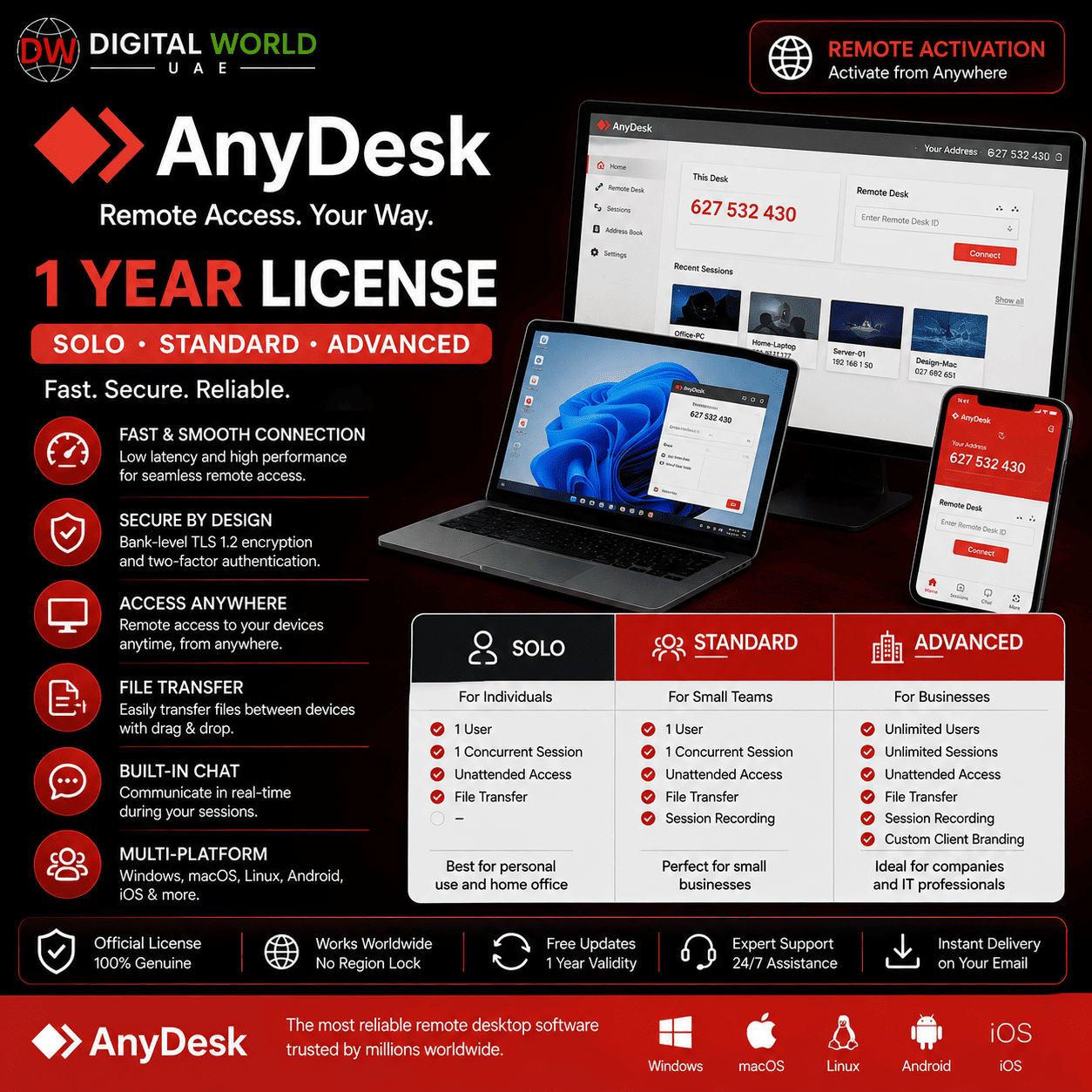
AnyDesk – 1 Year License | Solo, Standard & Advanced | Remote Activation
Price range: $45.00 through $110.00
✓ AnyDesk Professional License – 1 Year
✓ 3 Plans Available: Solo, Standard & Advanced
✓ Solo – Best for Individuals
✓ Standard – Best for Small Teams
✓ Advanced – Best for IT & Larger Teams
✓ Up to 100 / 500 / 1,000 Unattended Devices
✓ Session Recording, File Transfer, Privacy Mode & 2FA
✓ Remote Activation on Your Device
✓ Full Replacement Warranty
⚠️ AnyDesk ID & Temporary Remote Access Required for Activation
# AnyDesk – 1 Year License | Solo, Standard & Advanced
Get professional AnyDesk remote desktop access for 1 year with your choice of Solo, Standard, or Advanced plan.
Choose the plan according to your individual, small-team, or larger IT-team requirements.
The license is activated remotely on the device where you want to use AnyDesk. Install AnyDesk, send us your AnyDesk ID on our whatsapp number, and our technical team will connect to your computer/laptop to complete the activation.
## Available Plans
### AnyDesk Solo – 1 Year
Best suited for individual users who need professional remote access on a smaller scale.
✓ 1 Concurrent Connection
✓ Maximum 1 Concurrent Connection
✓ Up to 100 Unattended Access Devices
✓ Unlimited Interactive Access
✓ 1 Address Book / 100 Entries
✓ Session Recording
✓ File Transfer
✓ Privacy Mode
✓ 2FA
✓ API Access
✓ Limited User Management
✓ Limited Permission Profiles
✓ Limited Group Policy
✓ Limited Command Line Interface
✓ Limited MDM
✗ Custom Client
✗ MSI Mass Deployment
✗ Phone Support
Best For: Individual Users
### AnyDesk Standard – 1 Year
Designed for small teams that require more unattended devices, shared address books, and additional administration features.
✓ 1 Concurrent Connection
✓ Maximum Concurrent Connections: Up to 20
✓ Up to 500 Unattended Access Devices
✓ Unlimited Interactive Access
✓ 6 Address Books / 5 Shared
✓ Session Recording
✓ File Transfer
✓ Privacy Mode
✓ 2FA
✓ API Access
✓ Custom Client
✓ Basic User Management
✓ Permission Profiles
✓ Group Policy
✓ Limited Command Line Interface
✓ MDM
✗ MSI Mass Deployment
✗ Phone Support
Best For: Small Teams
### AnyDesk Advanced – 1 Year
The most feature-rich option, designed for IT departments and larger teams requiring advanced management and deployment capabilities.
✓ 2 Concurrent Connections
✓ Maximum Concurrent Connections: Up to 50
✓ Up to 1,000 Unattended Access Devices
✓ Unlimited Interactive Access
✓ 16 Address Books / 15 Shared
✓ Session Recording
✓ File Transfer
✓ Privacy Mode
✓ 2FA
✓ API Access
✓ Custom Client
✓ Advanced User Management
✓ Permission Profiles
✓ Group Policy
✓ Full Command Line Interface
✓ MSI Mass Deployment
✓ MDM
✓ Phone Support
Best For: IT Departments & Larger Teams
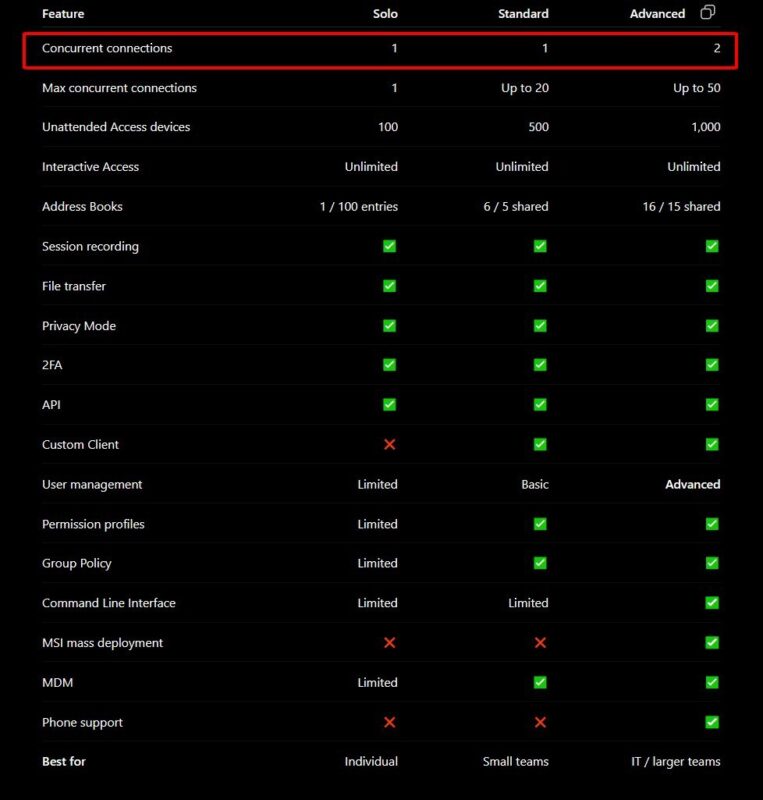
## Quick Plan Comparison
## Which Plan Should I Choose?
Choose SOLO if you are an individual user and mainly need professional remote access for your own work.
Choose STANDARD if you have a small team and need additional unattended devices, shared address books, Custom Client, Group Policy, and better user management.
Choose ADVANCED if you are managing a larger team or IT environment and require 2 concurrent connections, up to 1,000 unattended devices, advanced user management, MSI mass deployment, MDM, and other advanced administration features.
## How Activation Works
1. Install AnyDesk on the computer or laptop where you want to use the license.
2. Open AnyDesk and locate your AnyDesk ID.
3. Send your AnyDesk ID to our support team.
4. Our technician will temporarily connect to your device.
5. We will activate the selected AnyDesk license.
6. After activation is completed, you can start using AnyDesk normally.
⚠️ Remote access to the target device is required for activation.
## Full Replacement Warranty
✓ Full Replacement Warranty During the Subscription Period
If your AnyDesk license expires unexpectedly or develops an eligible license-related problem during your active subscription period, contact our support team on whatsapp.
For warranty support, you may be asked to:
1. Install UltraViewer or TeamViewer.
2. Send the temporary Remote ID and Password to our support team on whatsapp.
3. Our technician will connect temporarily to your device.
4. We will check the license and attempt to repair, reactivate, or replace it.
5. After the issue is resolved, you can continue using AnyDesk normally.
## Remote Support & Security
For your privacy and security:
• Remote access is required only for activation or troubleshooting when necessary.
• Stay present during the remote session whenever possible.
• Close banking, personal, confidential, and unrelated applications before allowing remote access.
• Only share temporary remote-access credentials while actively communicating with our support team.
• You do not need to provide your personal email, banking, or Windows login passwords unless a specific legitimate software process requires information from you directly.
## Important Notes
• License Validity: 1 Year
• Available Plans: Solo, Standard & Advanced
• Activation Method: Remote Activation
• Install AnyDesk before requesting activation.
• AnyDesk ID is required for initial activation.
• Full Replacement Warranty is included during the covered subscription period.
• TeamViewer or UltraViewer may be required if remote warranty support is needed.
• Features depend on the selected plan.
• Do not remove or modify license-related configuration after activation without contacting support.
## Frequently Asked Questions
Q. What plans are available?
A. You can choose AnyDesk Solo, Standard, or Advanced for 1 year.
Q. Which plan is best for one person?
A. Solo is designed primarily for individual users.
Q. Which plan is suitable for a small team?
A. Standard is designed for small teams and provides additional management and shared-access features.
Q. Which is the most powerful plan?
A. Advanced offers the most features and is designed for IT departments and larger teams.
Q. How many unattended devices are supported?
A. According to the supplied plan comparison, Solo supports up to 100, Standard up to 500, and Advanced up to 1,000 unattended access devices.
Q. Does Advanced support MSI mass deployment?
A. Yes. MSI mass deployment is included with Advanced according to the supplied feature comparison.
Q. How will you activate my license?
A. Install AnyDesk and send us your AnyDesk ID. Our technical team will remotely connect to your computer/laptop and complete the activation.
Q. Can I activate the license myself?
A. No. This product requires remote activation by our technical team.
Q. Is warranty included?
A. Yes. Full replacement warranty is included during the covered subscription period for eligible license-related issues.
Q. What happens if the license stops working?
A. Contact our support team. You may be asked to install TeamViewer or UltraViewer so our technician can temporarily connect and repair, reactivate, or replace the license.
Q. How long will it take to deliver?
A. Standard delivery time is between few hours to 5 working days, depending on product.
| Plans | Anydesk Solo, Anydesk Standard, Anydesk Advanced |
|---|