
Autodesk Construction Cloud (ACC) – Cloud Collaboration Suite | Activation on Your Email | 1 Year Subscription
$335.00
✓ Autodesk Construction Cloud (ACC) / Autodesk Forma
✓ Activation on Your Own Email
✓ Autodesk Docs / Forma Data Management
✓ Autodesk Build / Forma Build
✓ Autodesk Takeoff / Forma Takeoff
✓ Autodesk Forma
✓ Construction Cloud Insight
✓ Autodesk Bridge
✓ Document & Project Management
✓ Cloud Construction Collaboration
✓ Revit Cloud Workflows Supported*
⚠️ Revit Desktop Application NOT Included
*Appropriate Revit license is separately required for Revit desktop authoring and full Revit Cloud Worksharing.
Autodesk Construction Cloud (ACC) – Cloud Collaboration Suite – 1 Year Subscription
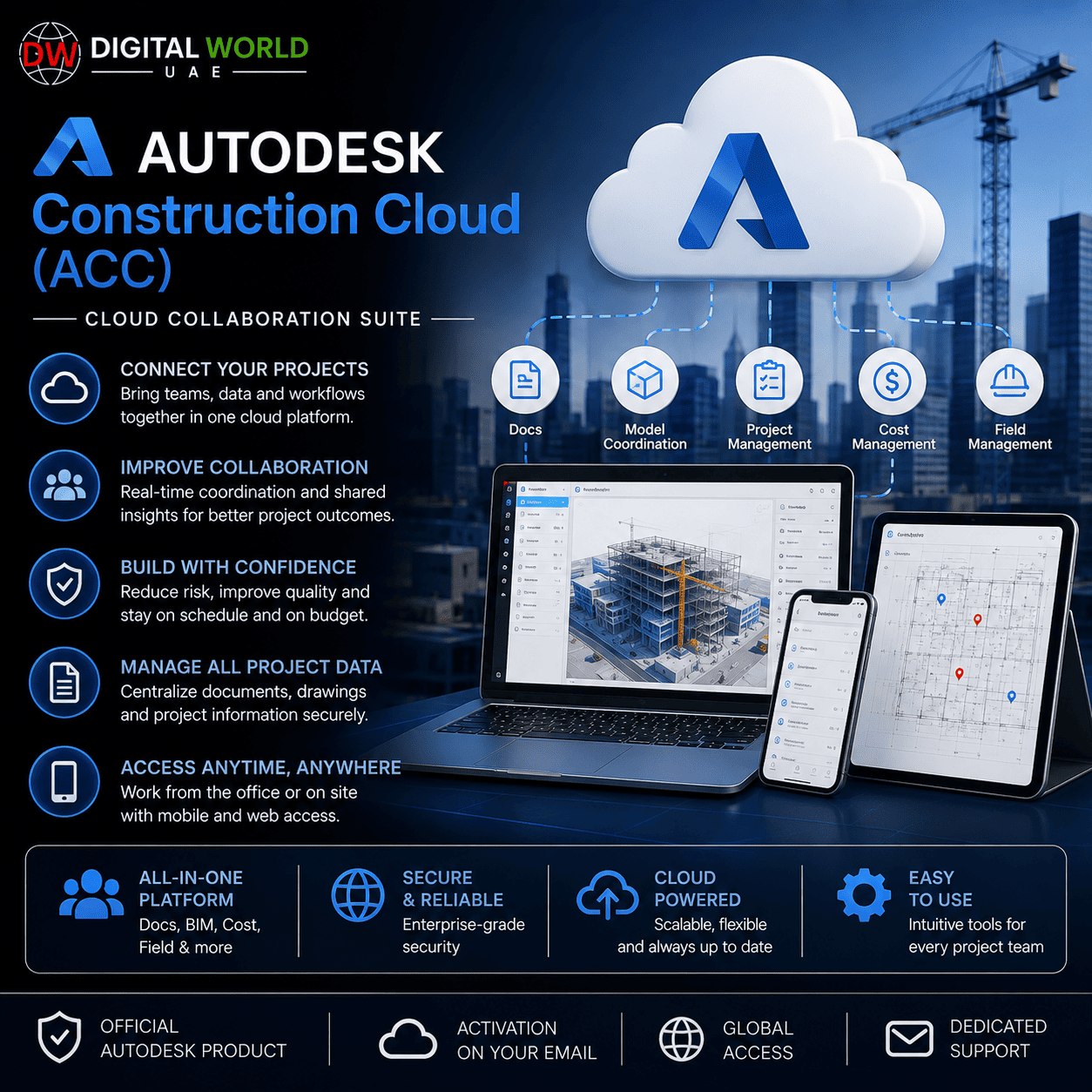
Manage construction projects, documents, design collaboration, takeoffs, project information, and cloud-based workflows through Autodesk’s connected construction platform.
This product is activated directly on the customer’s own email address and provides access to the included Autodesk Construction Cloud / Autodesk Forma services according to the supplied entitlement.
⚠️ IMPORTANT: Revit Desktop Software is NOT included with this product.
This package supports Autodesk’s cloud-based construction and collaboration workflows. If you want to author or edit Revit models using the Revit desktop application, you must have a separate eligible Revit license/subscription.
What’s Included
Depending on the supplied entitlement, access includes:
✓ Autodesk Docs / Forma Data Management
✓ Autodesk Build / Forma Build
✓ Autodesk Takeoff / Forma Takeoff
✓ Autodesk Forma
✓ Autodesk Construction Cloud Insight
✓ Autodesk Bridge
✓ Cloud-Based Project Collaboration
✓ Document Management
✓ Construction Project Management
✓ Revit Cloud Collaboration Support
✓ Activation on Customer’s Own Email
Autodesk Docs / Forma Data Management
Autodesk Docs provides a centralized cloud environment for managing construction and design documents.
It helps project teams:
✓ Centralize Project Files
✓ Organize Drawings & Documents
✓ Control File Access
✓ Share Project Information
✓ Maintain a Common Data Environment
✓ Collaborate with Project Stakeholders
✓ Access Current Project Information
Instead of keeping important construction information scattered across different systems, project teams can maintain project documents in a connected cloud environment.
Autodesk Build / Forma Build
Autodesk Build provides connected construction and project-management workflows for field and office teams.
It is designed to support workflows such as:
✓ Project Management
✓ Field Management
✓ RFIs
✓ Submittals
✓ Daily Reports
✓ Issue Management
✓ Project Information
✓ Construction Coordination
✓ Field-to-Office Collaboration
This helps construction teams keep project information connected throughout the construction lifecycle.
Autodesk Takeoff / Forma Takeoff
Autodesk Takeoff provides cloud-based quantity takeoff workflows.
It can be used to:
✓ Perform 2D Takeoffs
✓ Generate Quantities from 3D Models
✓ Review Project Drawings
✓ Improve Quantity Estimation Workflows
✓ Connect Takeoff Information with Project Data
This can be particularly useful for estimators, contractors, quantity surveyors, and preconstruction teams.
Autodesk Forma
Autodesk Forma provides cloud-based tools for architecture, engineering, and construction workflows.
Depending on the available entitlement, Forma can support:
✓ Cloud-Based Project Workflows
✓ Conceptual Design
✓ Real-World Project Context
✓ 3D Visualization
✓ Environmental Analysis
✓ Design Collaboration
✓ Connection with Autodesk Docs
✓ Integration with Revit Workflows
✓ Collaboration Across AEC Teams
Forma can connect with Revit, allowing project teams to move information between cloud-based design and detailed Revit workflows.
Autodesk Construction Cloud Insight
Insight provides project analytics and visibility based on information collected within the construction platform.
It can help teams:
✓ Review Project Information
✓ Monitor Project Activity
✓ Analyze Construction Data
✓ Identify Potential Risks
✓ Improve Project Decision-Making
✓ Access Connected Project Analytics
Available dashboards and analytics depend on the services and project permissions assigned to the user.
Autodesk Bridge
Bridge helps teams share project information between Autodesk cloud projects and accounts.
It can be used to:
✓ Share Files Between Projects
✓ Share Sheets Between Projects
✓ Connect Projects Across Accounts
✓ Set Up Automated Sharing
✓ Keep Teams Updated with Current Information
✓ Improve Cross-Project Collaboration
Bridge is particularly useful when different project teams or organizations need controlled sharing without manually duplicating project information.
Revit Cloud Support – Important Information
Yes, this product can support Autodesk’s Revit cloud workflows when the required collaboration entitlement is included.
However:
⚠️ REVIT DESKTOP APPLICATION IS NOT INCLUDED.
There is an important difference between the cloud collaboration service and the Revit desktop software.
What the Cloud Service Does
With the appropriate Autodesk cloud collaboration entitlement, Revit teams can use cloud-based workflows to:
✓ Store Revit Models in the Cloud
✓ Access Cloud Projects
✓ Collaborate on Revit Models
✓ Centralize Project Design Data
✓ Publish Models for Project Stakeholders
✓ Work with Project Teams through Autodesk’s Cloud Environment
For full Revit Cloud Worksharing, appropriately licensed users can work concurrently on a shared cloud model.
What Is NOT Included
✗ Revit Desktop Application
✗ Standalone Revit License
✗ Revit Commercial Subscription
This product should therefore NOT be purchased as a replacement for a Revit software license.
If you need to create, open, author, or edit Revit projects using the Revit desktop application, you must separately have access to an eligible Revit license.
Revit Cloud Worksharing Requirements
For full cloud worksharing, each Revit user generally needs the appropriate entitlements assigned to the same Autodesk account.
This includes:
1. An eligible Revit subscription/license for the Revit desktop application.
2. The appropriate Autodesk cloud collaboration entitlement for Revit Cloud Worksharing.
The cloud collaboration entitlement enables the collaborative cloud workflow; it does not replace the Revit desktop software license.
Who Is This Product For?
This package is suitable for:
✓ Construction Companies
✓ General Contractors
✓ Specialty Contractors
✓ Architects
✓ Engineers
✓ BIM Teams
✓ Project Managers
✓ Construction Managers
✓ Quantity Surveyors
✓ Estimators
✓ Design Coordination Teams
✓ Revit Teams Requiring Cloud Collaboration
✓ Organizations Managing Construction Projects in the Cloud
Activation Method
1. Place your order.
2. Provide the email address associated with your Autodesk account.
3. Our team will process the activation.
4. Access/invitation will be assigned to the supplied email according to the activation procedure.
5. Sign in using your Autodesk account.
6. Access the available Autodesk Construction Cloud / Forma services assigned to your account.
Please provide the correct email address when ordering.
Important Notes
• Activation is completed on the customer’s own email.
• This is a cloud construction/collaboration product.
• Autodesk Construction Cloud is now part of the Autodesk Forma platform.
• Some older ACC product names may appear under updated Autodesk Forma branding.
• Revit cloud workflows are supported according to the supplied collaboration entitlement.
• Revit Desktop Software is NOT included.
• A separate eligible Revit subscription is required when the Revit desktop application is needed.
• Available services and features depend on the entitlement assigned to the customer’s account.
• Individual project permissions may be controlled by the project/account administrator.
• Autodesk may update product names, interfaces, features, and service organization over time.
Frequently Asked Questions
Q. What is Autodesk Construction Cloud?
A. Autodesk Construction Cloud is Autodesk’s connected cloud environment for construction and AEC workflows. Autodesk has now incorporated/rebranded ACC services as part of the Autodesk Forma platform.
Q. Is Autodesk Docs included?
A. Yes, Autodesk Docs / the corresponding Forma Data Management functionality is included according to this supplied package.
Q. Is Autodesk Build included?
A. Yes, Autodesk Build / Forma Build is included according to this package.
Q. Is Autodesk Takeoff included?
A. Yes, Autodesk Takeoff / Forma Takeoff is included according to this package.
Q. Is Autodesk Forma included?
A. Yes, Autodesk Forma access is included according to the supplied entitlement.
Q. Is Autodesk Bridge included?
A. Yes. Bridge functionality is available for supported ACC/Forma projects and can be used for controlled sharing between projects/accounts.
Q. Does it support Revit Cloud?
A. Yes, the appropriate cloud collaboration entitlement can support Revit cloud workflows, including Revit Cloud Worksharing where applicable.
Q. Is Revit desktop software included?
A. No. Revit desktop software and a standalone Revit license are NOT included with this product.
Q. Why do I need Revit separately?
A. The cloud collaboration service provides the cloud environment and collaboration capabilities. Revit itself is the desktop authoring application. Autodesk requires the appropriate Revit entitlement in addition to the cloud collaboration entitlement for users working with Revit Cloud Worksharing.
Q. Can multiple Revit users work on the same cloud model?
A. Yes, Revit Cloud Worksharing is designed for concurrent collaboration, provided each participating user has the required Autodesk entitlements.
Q. Is activation on my own email?
A. Yes. Activation is processed using the customer’s supplied email address.
Q. Is this only for Revit?
A. No. The platform covers broader construction workflows including document management, project management, takeoff, design collaboration, analytics, information sharing, and other connected construction processes.
Q. How long will it take to deliver?
A. Standard delivery time is between few hours to 5 working days, depending on product.
Related products
Autodesk Autocad Full / AutoCAD LT – 1 Year Subscription Flex (Activation on Your Email)
Original price was: $510.00.$270.00Current price is: $270.00.

Chaos V-Ray Solo – 1 Year Subscription (Activation on Your Email)
Original price was: $540.00.$100.00Current price is: $100.00.