
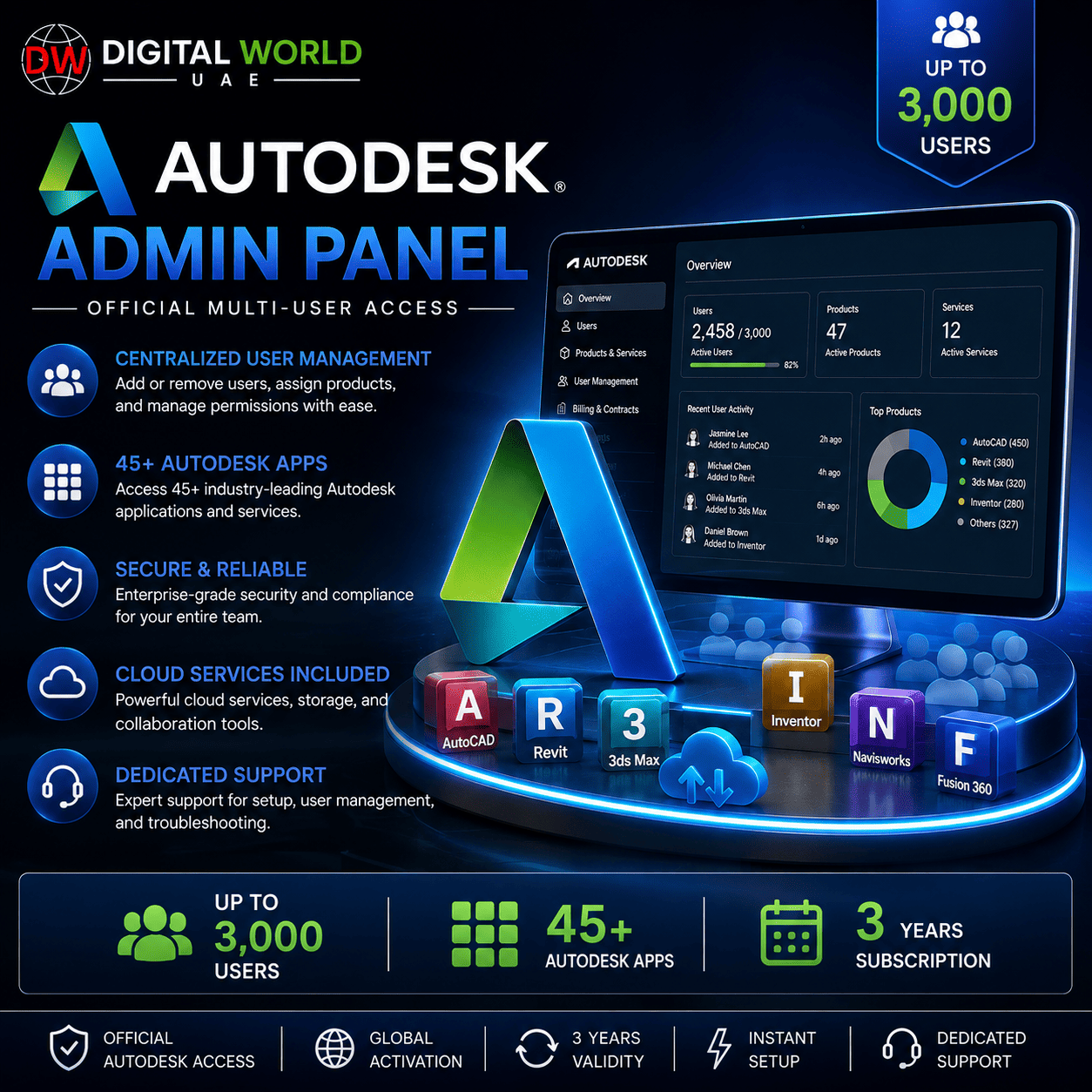

Autodesk Admin Panel – Up to 3,000 Users | 45+ Autodesk Apps | 3 Years
$150.00
✓ Autodesk Admin Panel
✓ Up to 3,000 Users
✓ Up to 3 Years Access
✓ 45+ Autodesk Applications
✓ AutoCAD, Revit, Civil 3D, Maya, 3ds Max & More
✓ Centralized User Management
✓ Educational Access
✓ Windows / Mac / Linux – Depending on Application
✓ Manual Delivery: Approx. 6–24 Hours
✓ 1 Year Replacement Warranty & Support
⚠️ Educational License – Not a Standard Commercial Autodesk Subscription
Autodesk Admin Panel – Up to 3,000 Users | 45+ Autodesk Apps | 3 Years
Manage Autodesk educational access for a large number of users from a centralized Admin Panel.
This package provides an Autodesk Admin Panel with the ability to invite and manage up to 3,000 users. Invited users can access a wide range of supported Autodesk applications under the educational entitlement associated with the panel.
Ideal for organizations, training environments, educational use, or administrators who need centralized management for a large number of Autodesk users.
What’s Included
✓ Autodesk Admin Panel Access
✓ Up to 3,000 Users
✓ Up to 3 Years Validity
✓ Educational Access
✓ 45+ Autodesk Applications
✓ Centralized User Management
✓ Add & Manage Users from Admin Dashboard
✓ Windows, macOS & Linux Support Depending on Application
✓ Manual Delivery & Setup
✓ 1 Year Replacement Warranty & Support
Popular Autodesk Applications
The available Autodesk software may include:
✓ AutoCAD
✓ Revit
✓ Civil 3D
✓ 3ds Max
✓ Maya
✓ Inventor
✓ AutoCAD Plant 3D
✓ Fusion
✓ Navisworks
✓ InfraWorks
✓ MotionBuilder
✓ Mudbox
✓ ReCap Pro
✓ Robot Structural Analysis
✓ Vehicle Tracking
✓ And many other supported Autodesk applications
Application availability and operating-system compatibility vary by Autodesk product.
Up to 3,000 Users
The Admin Panel is designed for large-scale user management.
You can:
✓ Invite Users
✓ Add & Manage Up to 3,000 Users
✓ Manage User Access
✓ Assign Available Autodesk Products
✓ Remove Users When Required
✓ Manage Access from a Centralized Dashboard
This makes the package especially useful when Autodesk access needs to be managed for a large number of users.
Educational License
⚠️ IMPORTANT: This is an Autodesk EDUCATIONAL entitlement.
It should not be represented as a standard Autodesk commercial/business subscription.
The available applications can provide their normal software functionality, but usage remains subject to Autodesk’s educational eligibility, licensing terms, and permitted-use conditions.
Customers should purchase this product only if educational access is suitable for their intended use.
Cross-Platform Availability
Autodesk offers applications across different operating systems.
Depending on the individual Autodesk application:
✓ Windows – Supported by many Autodesk products
✓ macOS – Supported by selected Autodesk products
✓ Linux – Supported by selected Autodesk products
⚠️ This does NOT mean every Autodesk application works on all three operating systems.
For example, some Autodesk applications are Windows-only, while others have macOS or Linux versions. Always check the system requirements for the specific Autodesk application you intend to use.
Delivery Information
• Product Type: Autodesk Admin Panel
• User Capacity: Up to 3,000 Users
• Validity: Up to 3 Years
• License Type: Educational
• Delivery Method: Manual
• Estimated Delivery: 6–24 Hours
manual delivery, you will receive the applicable administrator access/instructions required to manage users.
Important Notes
• This is an Educational Autodesk Admin Panel.
• Maximum advertised capacity is up to 3,000 users.
• Access is provided for up to 3 years according to the supplied package.
• 45+ Autodesk applications may be available through the panel.
• Not every Autodesk application supports Windows, macOS and Linux.
• Individual software compatibility depends on Autodesk’s requirements for that application.
• Application availability may change according to Autodesk’s current educational catalog and entitlement policies.
• Educational access is subject to Autodesk’s applicable terms and eligibility requirements.
• This product should not be confused with a standard commercial Autodesk enterprise subscription.
• Delivery and configuration are processed manually.
Warranty & Support
Replacement warranty and after-sales support are included according to the warranty conditions of the supplied package.
If an eligible panel/access-related issue occurs during the covered warranty period, contact our support team for review.
Depending on the issue, our team will attempt to repair, restore, or replace the affected access according to the applicable warranty policy.
Frequently Asked Questions
Q. How many users can I add?
A. The supplied Admin Panel supports up to 3,000 users.
Q. How long is the validity?
A. This package provides up to 3 years of validity according to the supplied entitlement.
Q. Is this a commercial Autodesk license?
A. No. This product provides Autodesk educational access and should not be treated as a standard commercial/business Autodesk subscription.
Q. How many Autodesk applications are included?
A. The supplied panel provides access to 45+ supported Autodesk applications, subject to the applications currently available under the entitlement.
Q. Does it include AutoCAD?
A. AutoCAD is listed among the supported applications.
Q. Does it include Revit and Civil 3D?
A. Yes, Revit and Civil 3D are listed among the available applications.
Q. Does it include 3ds Max and Maya?
A. Yes, both are listed among the available applications.
Q. Can I manage users myself?
A. Yes. The Admin Panel is intended to provide centralized user-management capabilities for the supplied entitlement.
Q. Does every Autodesk application work on Windows, Mac and Linux?
A. No. Compatibility varies by application. Some Autodesk products are Windows-only, while selected products support macOS or Linux.
Q. How long will it take to deliver?
A. Estimated delivery for this product is approximately 6–24 hours. Standard delivery time is between few hours to 5 working days, depending on product.
Related products
Autodesk AEC Collection Commercial Flex License (1 Year)
Original price was: $3,675.00.$424.00Current price is: $424.00.
Autodesk Autocad Full / AutoCAD LT – 1 Year Subscription Flex (Activation on Your Email)
Original price was: $510.00.$270.00Current price is: $270.00.

Chaos Corona Solo – 1 Year Subscription (Activation on Your Email)
Original price was: $375.00.$120.00Current price is: $120.00.