




YouTube Premium Family Invitation – 12 Months
$50.00
✔ YouTube Premium Family Invitation
✔ 12 Months Access
✔ Provide your new gmail id is recommended
✔ For existing gmail ids make sure you have not joined any google family within last 12 months
✔ Official Invitation Link
✔ Full Time Replacement Warranty
✔ Delivery Time Between few hours to 48 hours
Enjoy YouTube Premium through an official Family Invitation with ad-free videos, background playback, offline downloads and YouTube Music Premium.
━━━━━━━━━━━━━━━━━━━━
WHAT YOU GET
✔ YouTube Premium Family Invitation
✔ Duration: 12 Months
✔ Activation on a NEW Gmail id is recommended or provide existing gmail id only if since last 12 months you had not joined any google family for youtube or google ai pro.
✔ Official Family Invitation
✔ Full Time Replacement Warranty
━━━━━━━━━━━━━━━━━━━━
FEATURES
✔ Ad-Free YouTube
✔ Background Playback
✔ Offline Downloads
✔ YouTube Music Premium
✔ Works on All Supported Devices
✔ Expiry Date Visible After Joining the Family
━━━━━━━━━━━━━━━━━━━━
IMPORTANT
✔ A NEW Gmail id is recommended.
❌ Existing/Old Gmail accounts are not recommended.
✔ After payment you will receive an official invitation link.
✔ Simply click the invitation link and join the family group.
✔ Once joined, your YouTube account will automatically become Premium.
✔ You can verify the subscription expiry date from your Google account.
━━━━━━━━━━━━━━━━━━━━
DELIVERY
✔ Official Invitation Link
✔ Manual Delivery within few hours to 1 day.
✔ Full Time Replacement Warranty
✔ Dedicated Customer Support
━━━━━━━━━━━━━━━━━━━━
TROUBLESHOOTING
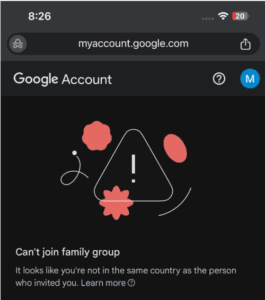
How to Fix “You are not in the same country” Error (YouTube Premium Family Invitation)
If you receive the error “You are not in the same country as the family manager”, follow these steps carefully:
Step 1: Leave Your Current Google Family
Open the Google Families page:
https://families.google.com/families/
Sign in with your Google account.
If you are already a member of a Family Group, choose Leave family group.
Step 2: Close Your Google Payments Profile
Open Google Payments:
Sign in with the same Google account.
Go to Settings.
Scroll down and select Close payments profile.
Follow the on-screen instructions to confirm.
Note: Closing your Payments Profile does not delete your Google account or Gmail.
Step 3: Wait
Wait 5–10 minutes for Google’s servers to update your account.
Step 4: Open Your Invitation
Open the YouTube Premium Family Invitation link that we provided.
Step 5: Join the Family
Accept the invitation and complete the joining process.
Step 6: Enjoy YouTube Premium
Once you have joined successfully, your YouTube Premium benefits will be activated.
Important Notes
✅ Sign in with the same Google account that you provided to us.
✅ Do not use a VPN while joining the invitation.
✅ You can only be a member of one Google Family Group at a time.
✅ If you still receive the same error, contact us with a screenshot so we can assist you further.
Related products



Reviews
There are no reviews yet.